


















[Cookbook] [Try WebUI] [中文README] [Samples]
Core capabilities:
Tool Sandboxing — tool call runs inside a hardened sandbox
Agent-as-a-Service (AaaS) APIs — expose agents as streaming, production-ready APIs
Scalable Deployment — deploy locally, on Kubernetes, or serverless for elastic scale
Plus
Full-stack observability (logs / traces)
Framework compatibility with mainstream agent frameworks
NOTE
Recommended reading order:
- I want to run an agent app in 5 minutes: Quick Start (Agent App example) → verify with curl (SSE streaming)
- I care about secure tool execution / automation: Quick Start (Sandbox examples) → sandbox image registry/namespace/tag configuration → (optional) production-grade serverless sandbox deployment
- I want production deployment / expose APIs: Quick Start (Agent App example) → Quick Start (Deployment example) → Guides
- I want to contribute: Contributing → Contact
- News
- Key Features
- Quick Start: From installation to running a minimal Agent API service. Learn the three-stage
AgentAppdevelopment pattern:init/query/shutdown.- Prerequisites: Required runtime environment and dependencies
- Installation: Install from PyPI or from source
- Agent App Example: How to build a streaming (SSE) Agent-as-a-Service API
- Sandbox Example: How to safely execute Python/Shell/GUI/Browser/Filesystem/Mobile tools in an isolated sandbox
- Deployment Example: Learn to deploy with
DeployManagerlocally or in a serverless environment, and access the service via A2A, Response API, or the OpenAI SDK in compatible mode
- Guides: A tutorial site covering AgentScope Runtime concepts, architecture, APIs, and sample projects—helping you move from “it runs” to “scalable and maintainable”.
- Contact
- Contributing
- License
- Contributors
- [2026-02] A major architectural refactor of
AgentAppin v1.1.0. By adopting direct inheritance fromFastAPIand deprecating the previous factory pattern,AgentAppnow offers seamless integration with the full FastAPI ecosystem, significantly boosting extensibility. Furthermore, we've introduced a Distributed Interrupt Service, enabling manual task preemption during agent execution and allowing developers to customize state persistence and recovery logic flexibly. Please refer to the CHANGELOG for full update details and migration guide. - [2026-01] Added asynchronous sandbox implementations (
BaseSandboxAsync,GuiSandboxAsync,BrowserSandboxAsync,FilesystemSandboxAsync,MobileSandboxAsync) enabling non-blocking, concurrent tool execution in async program. Improvedrun_ipython_cellandrun_shell_commandmethods with enhanced concurrency and parallel execution capabilities for more efficient sandbox operations. - [2025-12] We have released AgentScope Runtime v1.0, introducing a unified “Agent as API” white-box development experience, with enhanced multi-agent collaboration, state persistence, and cross-framework integration. This release also streamlines abstractions and modules to ensure consistency between development and production environments. Please refer to the CHANGELOG for full update details and migration guide.
- Deployment Infrastructure: Built-in services for agent state management, conversation history, long-term memory, and sandbox lifecycle control
- Framework-Agnostic: Not tied to any specific agent framework; seamlessly integrates with popular open-source and custom implementations
- Developer-Friendly: Offers
AgentAppfor easy deployment with powerful customization options - Observability: Comprehensive tracking and monitoring of runtime operations
- Sandboxed Tool Execution: Isolated sandbox ensures safe tool execution without affecting the system
- Out-of-the-Box Tools & One-Click Adaptation: Rich set of ready-to-use tools, with adapters enabling quick integration into different frameworks
NOTE
About Framework-Agnostic: Currently, AgentScope Runtime supports the AgentScope framework. We plan to extend compatibility to more agent development frameworks in the future. This table shows the current version’s adapter support for different frameworks. The level of support for each functionality varies across frameworks:
| Framework/Feature | Message/Event | Tool |
|---|---|---|
| AgentScope | ✅ | ✅ |
| LangGraph | ✅ | 🚧 |
| Microsoft Agent Framework | ✅ | ✅ |
| Agno | ✅ | ✅ |
| AutoGen | 🚧 | ✅ |
- Python 3.10 or higher
- pip or uv package manager
From PyPI:
# Install core dependencies
pip install agentscope-runtime

# Install extension
pip install "agentscope-runtime[ext]"

# Install preview version
pip install --pre agentscope-runtime
(Optional) From source:
# Pull the source code from GitHub
git clone -b main https://github.com/agentscope-ai/agentscope-runtime.git
cd agentscope-runtime

# Install core dependencies
pip install -e .
This example demonstrates how to create an agent API server using agentscope ReActAgent and AgentApp. To run a minimal AgentScope Agent with AgentScope Runtime, you generally need to implement:
Define lifespan– Usecontextlib.asynccontextmanagerto manage resource initialization (e.g., state services) at startup and cleanup on exit.@agent_app.query(framework="agentscope")– Core logic for handling requests, must usestream_printing_messagestoyield msg, lastfor streaming output
import os
from contextlib import asynccontextmanager

from fastapi import FastAPI
from agentscope.agent import ReActAgent
from agentscope.model import DashScopeChatModel
from agentscope.formatter import DashScopeChatFormatter
from agentscope.tool import Toolkit, execute_python_code
from agentscope.pipeline import stream_printing_messages
from agentscope.memory import InMemoryMemory
from agentscope.session import RedisSession

from agentscope_runtime.engine import AgentApp
from agentscope_runtime.engine.schemas.agent_schemas import AgentRequest

# 1. Define lifespan manager
@asynccontextmanager
async def lifespan(app: FastAPI):
    """Manage resources during service startup and shutdown"""
    # Startup: Initialize Session manager
    import fakeredis

    fake_redis = fakeredis.aioredis.FakeRedis(decode_responses=True)
    # NOTE: This FakeRedis instance is for development/testing only.
    # In production, replace it with your own Redis client/connection
    # (e.g., aioredis.Redis)
    app.state.session = RedisSession(connection_pool=fake_redis.connection_pool)

    yield  # Service is running

    # Shutdown: Add cleanup logic here (e.g., closing database connections)
    print("AgentApp is shutting down...")

# 2. Create AgentApp instance
agent_app = AgentApp(
    app_name="Friday",
    app_description="A helpful assistant",
    lifespan=lifespan,
)

# 3. Define request handling logic
@agent_app.query(framework="agentscope")
async def query_func(
    self,
    msgs,
    request: AgentRequest = None,
    **kwargs,
):
    session_id = request.session_id
    user_id = request.user_id

    toolkit = Toolkit()
    toolkit.register_tool_function(execute_python_code)

    agent = ReActAgent(
        name="Friday",
        model=DashScopeChatModel(
            "qwen-turbo",
            api_key=os.getenv("DASHSCOPE_API_KEY"),
            stream=True,
        ),
        sys_prompt="You're a helpful assistant named Friday.",
        toolkit=toolkit,
        memory=InMemoryMemory(),
        formatter=DashScopeChatFormatter(),
    )
    agent.set_console_output_enabled(enabled=False)

    # Load state
    await agent_app.state.session.load_session_state(
        session_id=session_id,
        user_id=user_id,
        agent=agent,
    )

    async for msg, last in stream_printing_messages(
        agents=[agent],
        coroutine_task=agent(msgs),
    ):
        yield msg, last

    # Save state
    await agent_app.state.session.save_session_state(
        session_id=session_id,
        user_id=user_id,
        agent=agent,
    )

# 4. Run the application
agent_app.run(host="127.0.0.1", port=8090)
The server will start and listen on: http://localhost:8090/process. You can send JSON input to the API using curl:
curl -N \
  -X POST "http://localhost:8090/process" \
  -H "Content-Type: application/json" \
  -d '{
    "input": [
      {
        "role": "user",
        "content": [
          { "type": "text", "text": "What is the capital of France?" }
        ]
      }
    ]
  }'
You’ll see output streamed in Server-Sent Events (SSE) format:
data: {"sequence_number":0,"object":"response","status":"created", ... }
data: {"sequence_number":1,"object":"response","status":"in_progress", ... }
data: {"sequence_number":2,"object":"message","status":"in_progress", ... }
data: {"sequence_number":3,"object":"content","status":"in_progress","text":"The" }
data: {"sequence_number":4,"object":"content","status":"in_progress","text":" capital of France is Paris." }
data: {"sequence_number":5,"object":"message","status":"completed","text":"The capital of France is Paris." }
data: {"sequence_number":6,"object":"response","status":"completed", ... }
These examples demonstrate how to create sandboxed environments and execute tools within them, with some examples featuring interactive frontend interfaces accessible via VNC (Virtual Network Computing):
NOTE
If you want to run the sandbox locally, the current version supports Docker (optionally with gVisor) or BoxLite as the backend, and you can switch the backend by setting the environment variable CONTAINER_DEPLOYMENT (supported values include docker / gvisor / boxlite etc.; default: docker).
For large-scale remote/production deployments, we recommend using Kubernetes (K8s), Function Compute (FC), or Alibaba Cloud Container Service for Kubernetes (ACK) as the backend. Please refer to this tutorial for more details.
TIP
AgentScope Runtime provides both synchronous and asynchronous versions for each sandbox type
| Synchronous Class | Asynchronous Class |
|---|---|
BaseSandbox | BaseSandboxAsync |
GuiSandbox | GuiSandboxAsync |
FilesystemSandbox | FilesystemSandboxAsync |
BrowserSandbox | BrowserSandboxAsync |
MobileSandbox | MobileSandboxAsync |
TrainingSandbox | - |
AgentbaySandbox | - |
Use for running Python code or shell commands in an isolated environment.
# --- Synchronous version ---
from agentscope_runtime.sandbox import BaseSandbox

with BaseSandbox() as box:
    # By default, pulls `agentscope/runtime-sandbox-base:latest` from DockerHub
    print(box.list_tools()) # List all available tools
    print(box.run_ipython_cell(code="print('hi')"))  # Run Python code
    print(box.run_shell_command(command="echo hello"))  # Run shell command
    input("Press Enter to continue...")

# --- Asynchronous version ---
from agentscope_runtime.sandbox import BaseSandboxAsync

async with BaseSandboxAsync() as box:
    # Default image is `agentscope/runtime-sandbox-base:latest`
    print(await box.list_tools_async())  # List all available tools
    print(await box.run_ipython_cell(code="print('hi')"))  # Run Python code
    print(await box.run_shell_command(command="echo hello"))  # Run shell command
    input("Press Enter to continue...")
Provides a virtual desktop environment for mouse, keyboard, and screen operations.

# --- Synchronous version ---
from agentscope_runtime.sandbox import GuiSandbox

with GuiSandbox() as box:
    # By default, pulls `agentscope/runtime-sandbox-gui:latest` from DockerHub
    print(box.list_tools())  # List all available tools
    print(box.desktop_url)  # Web desktop access URL
    print(box.computer_use(action="get_cursor_position"))  # Get mouse cursor position
    print(box.computer_use(action="get_screenshot"))  # Capture screenshot
    input("Press Enter to continue...")

# --- Asynchronous version ---
from agentscope_runtime.sandbox import GuiSandboxAsync

async with GuiSandboxAsync() as box:
    # Default image is `agentscope/runtime-sandbox-gui:latest`
    print(await box.list_tools_async())  # List all available tools
    print(box.desktop_url)  # Web desktop access URL
    print(await box.computer_use(action="get_cursor_position"))  # Get mouse cursor position
    print(await box.computer_use(action="get_screenshot"))  # Capture screenshot
    input("Press Enter to continue...")
A GUI-based sandbox with browser operations inside an isolated sandbox.

# --- Synchronous version ---
from agentscope_runtime.sandbox import BrowserSandbox

with BrowserSandbox() as box:
    # By default, pulls `agentscope/runtime-sandbox-browser:latest` from DockerHub
    print(box.list_tools())  # List all available tools
    print(box.desktop_url)  # Web desktop access URL
    box.browser_navigate("https://www.google.com/")  # Open a webpage
    input("Press Enter to continue...")

# --- Asynchronous version ---
from agentscope_runtime.sandbox import BrowserSandboxAsync

async with BrowserSandboxAsync() as box:
    # Default image is `agentscope/runtime-sandbox-browser:latest`
    print(await box.list_tools_async())  # List all available tools
    print(box.desktop_url)  # Web desktop access URL
    await box.browser_navigate("https://www.google.com/")  # Open a webpage
    input("Press Enter to continue...")
A GUI-based sandbox with file system operations such as creating, reading, and deleting files.

# --- Synchronous version ---
from agentscope_runtime.sandbox import FilesystemSandbox

with FilesystemSandbox() as box:
    # By default, pulls `agentscope/runtime-sandbox-filesystem:latest` from DockerHub
    print(box.list_tools())  # List all available tools
    print(box.desktop_url)  # Web desktop access URL
    box.create_directory("test")  # Create a directory
    input("Press Enter to continue...")

# --- Asynchronous version ---
from agentscope_runtime.sandbox import FilesystemSandboxAsync

async with FilesystemSandboxAsync() as box:
    # Default image is `agentscope/runtime-sandbox-filesystem:latest`
    print(await box.list_tools_async())  # List all available tools
    print(box.desktop_url)  # Web desktop access URL
    await box.create_directory("test")  # Create a directory
    input("Press Enter to continue...")
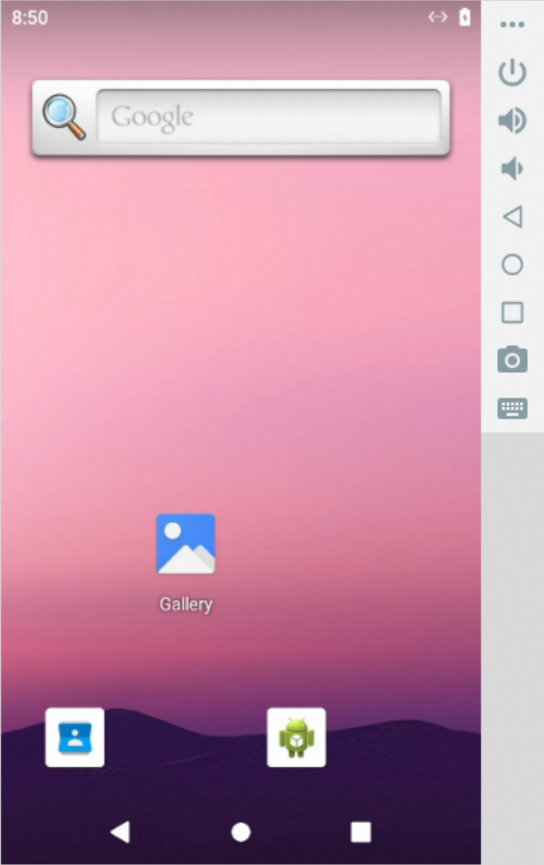
Provides a sandboxed Android emulator environment that allows executing various mobile operations, such as tapping, swiping, inputting text, and taking screenshots.
-
Linux Host: When running on a Linux host, this sandbox requires the
binderandashmemkernel modules to be loaded. If they are missing, execute the following commands on your host to install and load the required modules:# 1. Install extra kernel modules sudo apt update && sudo apt install -y linux-modules-extra-`uname -r` # 2. Load modules and create device nodes sudo modprobe binder_linux devices="binder,hwbinder,vndbinder" sudo modprobe ashmem_linux -
Architecture Compatibility: When running on an ARM64/aarch64 architecture (e.g., Apple M-series chips), you may encounter compatibility or performance issues. It is recommended to run on an x86_64 host.
# --- Synchronous version ---
from agentscope_runtime.sandbox import MobileSandbox

with MobileSandbox() as box:
    # By default, pulls 'agentscope/runtime-sandbox-mobile:latest' from DockerHub
    print(box.list_tools())  # List all available tools
    print(box.mobile_get_screen_resolution())  # Get the screen resolution
    print(box.mobile_tap([500, 1000]))  # Tap at coordinate (500, 1000)
    print(box.mobile_input_text("Hello from AgentScope!"))  # Input text
    print(box.mobile_key_event(3))  # HOME key event
    screenshot_result = box.mobile_get_screenshot()  # Get screenshot
    print(screenshot_result)
    input("Press Enter to continue...")

# --- Asynchronous version ---
from agentscope_runtime.sandbox import MobileSandboxAsync

async with MobileSandboxAsync() as box:
    # Default image is 'agentscope/runtime-sandbox-mobile:latest'
    print(await box.list_tools_async())  # List all available tools
    print(await box.mobile_get_screen_resolution())  # Get the screen resolution
    print(await box.mobile_tap([500, 1000]))  # Tap at coordinate (500, 1000)
    print(await box.mobile_input_text("Hello from AgentScope!"))  # Input text
    print(await box.mobile_key_event(3))  # HOME key event
    screenshot_result = await box.mobile_get_screenshot()  # Get screenshot
    print(screenshot_result)
    input("Press Enter to continue...")
NOTE
To add tools to the AgentScope Toolkit:
-
Wrap sandbox tool with
sandbox_tool_adapter, so the AgentScope agent can call them:from agentscope_runtime.adapters.agentscope.tool import sandbox_tool_adapter wrapped_tool = sandbox_tool_adapter(sandbox.browser_navigate) -
Register the tool with
register_tool_function:toolkit = Toolkit() Toolkit.register_tool_function(wrapped_tool)
If pulling images from DockerHub fails (for example, due to network restrictions), you can switch the image source to Alibaba Cloud Container Registry for faster access:
export RUNTIME_SANDBOX_REGISTRY="agentscope-registry.ap-southeast-1.cr.aliyuncs.com"
A namespace is used to distinguish images of different teams or projects. You can customize the namespace via an environment variable:
export RUNTIME_SANDBOX_IMAGE_NAMESPACE="agentscope"
For example, here agentscope will be used as part of the image path.
An image tag specifies the version of the image, for example:
export RUNTIME_SANDBOX_IMAGE_TAG="preview"
Details:
- Default is
latest, which means the image version matches the PyPI latest release. previewmeans the latest preview version built in sync with the GitHub main branch.- You can also use a specified version number such as
20250909. You can check all available image versions at DockerHub.
The sandbox SDK will build the full image path based on the above environment variables:
<RUNTIME_SANDBOX_REGISTRY>/<RUNTIME_SANDBOX_IMAGE_NAMESPACE>/runtime-sandbox-base:<RUNTIME_SANDBOX_IMAGE_TAG>
Example:
agentscope-registry.ap-southeast-1.cr.aliyuncs.com/agentscope/runtime-sandbox-base:preview
AgentScope Runtime also supports serverless deployment, which is suitable for running sandboxes in a serverless environment, e.g. Alibaba Cloud Function Compute (FC).
First, please refer to the documentation to configure the serverless environment variables. Make CONTAINER_DEPLOYMENT to fc to enable serverless deployment.
Then, start a sandbox server, use the --config option to specify a serverless environment setup:
# This command will load the settings defined in the `custom.env` file
runtime-sandbox-server --config fc.env
After the server starts, you can access the sandbox server at baseurl http://localhost:8000 and invoke sandbox tools described above.
The AgentApp exposes a deploy method that takes a DeployManager instance and deploys the agent.
-
The service port is set as the parameter
portwhen creating theLocalDeployManager. -
The service endpoint path is set as the parameter
endpoint_pathto/processwhen deploying the agent. -
The deployer will automatically add common agent protocols, such as A2A, Response API.
After deployment, users can access the service at http://localhost:8090/process:
from agentscope_runtime.engine.deployers import LocalDeployManager

# Create deployment manager
deployer = LocalDeployManager(
    host="0.0.0.0",
    port=8090,
)

# Deploy the app as a streaming service
deploy_result = await app.deploy(
    deployer=deployer,
    endpoint_path="/process"
)
After deployment, users can also access this service using the Response API of the OpenAI SDK:
from openai import OpenAI

client = OpenAI(base_url="http://localhost:8090/compatible-mode/v1")

response = client.responses.create(
  model="any_name",
  input="What is the weather in Beijing?"
)

print(response)
Besides, DeployManager also supports serverless deployments, such as deploying your agent app to ModelStudio.
import os
from agentscope_runtime.engine.deployers.modelstudio_deployer import (
    ModelstudioDeployManager,
    OSSConfig,
    ModelstudioConfig,
)

# Create deployment manager
deployer = ModelstudioDeployManager(
    oss_config=OSSConfig(
        access_key_id=os.environ.get("ALIBABA_CLOUD_ACCESS_KEY_ID"),
        access_key_secret=os.environ.get("ALIBABA_CLOUD_ACCESS_KEY_SECRET"),
    ),
    modelstudio_config=ModelstudioConfig(
        workspace_id=os.environ.get("MODELSTUDIO_WORKSPACE_ID"),
        access_key_id=os.environ.get("ALIBABA_CLOUD_ACCESS_KEY_ID"),
        access_key_secret=os.environ.get("ALIBABA_CLOUD_ACCESS_KEY_SECRET"),
        dashscope_api_key=os.environ.get("DASHSCOPE_API_KEY"),
    ),
)

# Deploy to ModelStudio
result = await app.deploy(
    deployer,
    deploy_name="agent-app-example",
    telemetry_enabled=True,
    requirements=["agentscope", "fastapi", "uvicorn"],
    environment={
        "PYTHONPATH": "/app",
        "DASHSCOPE_API_KEY": os.environ.get("DASHSCOPE_API_KEY"),
    },
)
For more advanced serverless deployment guides, please refer to the documentation.
For a more detailed tutorial, please refer to:
Welcome to join our community on
| Discord | DingTalk |
|---|---|
 |  |
We welcome contributions from the community! Here's how you can help:
- Use GitHub Issues to report bugs
- Include detailed reproduction steps
- Provide system information and logs
- Discuss new ideas in GitHub Discussions
- Follow the feature request template
- Consider implementation feasibility
- Fork the repository
- Create a feature branch (
git checkout -b feature/amazing-feature) - Commit your changes (
git commit -m 'Add amazing feature') - Push to the branch (
git push origin feature/amazing-feature) - Open a Pull Request
For detailed contributing guidelines, please see CONTRIBUTE.
AgentScope Runtime is released under the Apache License 2.0.
Copyright 2025 Tongyi Lab

Licensed under the Apache License, Version 2.0 (the "License");
you may not use this file except in compliance with the License.
You may obtain a copy of the License at

    http://www.apache.org/licenses/LICENSE-2.0

Unless required by applicable law or agreed to in writing, software
distributed under the License is distributed on an "AS IS" BASIS,
WITHOUT WARRANTIES OR CONDITIONS OF ANY KIND, either express or implied.
See the License for the specific language governing permissions and
limitations under the License.

Thanks goes to these wonderful people (emoji key):


This project follows the all-contributors specification. Contributions of any kind welcome!
