

A medical 3D case presentation and sharing system designed for hospitals, clinical teams, and medical education scenarios. Built with PHP, MySQL, and Three.js, the project supports case management, STL upload, server-side asynchronous preprocessing to GLB, secure front-end viewing, and Docker-based deployment.
link: https://3d.czsyyy.cn/v?token=cddaa9000ca8fb4ed363a4c8457ced10
password: 1234
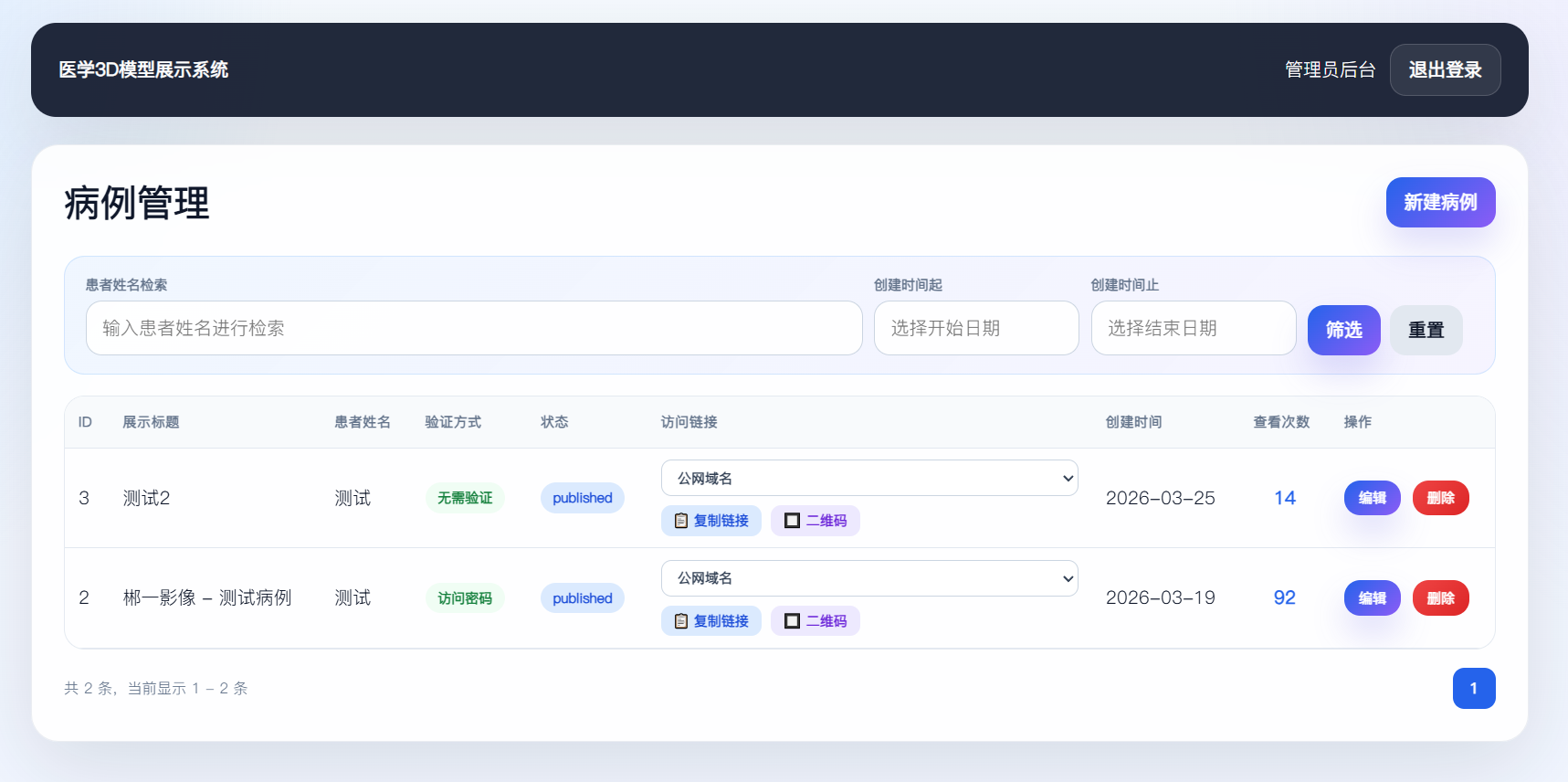
- Case management backend for creating, editing, deleting, and organizing cases and model assets
- STL upload with asynchronous preprocessing to generate GLB display assets on the server side
- Secure front-end access with
none / password / patient_nameverification modes - Multi-model 3D viewer with rotate, pan, zoom, background switching, model interaction, and color adjustment
- Frontend/backend dual-port isolation, suitable for hospital environments where only the viewer is exposed publicly
- Docker deployment with both development and production compose configurations
- Node.js preprocessing worker for automated STL → GLB conversion inside the container
- Backend:
PHP/PDO MySQL - Database:
MySQL 8 - Front-end 3D:
Three.js,GLTFLoader - Preprocessing:
Node.js,three - Gateway:
Nginx - Process management:
supervisord - Deployment:
Docker Compose
.
├─ app/                      PHP application logic
├─ bootstrap/                bootstrap, helpers, and autoloading
├─ config/                   configuration files
├─ database/migrations/      initialization SQL migrations
├─ docker/php/               PHP + Nginx + Worker container definition
├─ install/                  first-time installation wizard
├─ public/assets/            front-end static assets
├─ scripts/                  worker and STL→GLB processing scripts
└─ storage/uploads/          raw STL assets and processed GLB assets
Use docker-compose.yml:
docker compose up -d --build
After the container starts, open the installer:
- Front-end installer entry:
http://<host>:8098/install/
The installation workflow is handled by install/install.php, which automatically:
- creates the database
- executes SQL files under
database/migrations - creates the administrator account
- writes
.env - creates
storage/installed.lock
Default design:
- Frontend:
8098 - Backend:
8099
The dual Nginx entry points are defined in docker/php/nginx.conf and docker/php/nginx.conf.
Recommended deployment strategy:
- Expose the frontend publicly if needed
- Keep the backend accessible only from the intranet
- Expose only frontend traffic through router forwarding or reverse proxy
The project supports multiple share channels that administrators can choose manually when generating links and QR codes:
- intranet address
- external LAN IP
- public domain
Configuration file:
Environment variables:
APP_FRONT_URLAPP_SHARE_PUBLIC_URLAPP_SHARE_DEFAULT_CHANNEL
This design ensures that shared links and QR codes are explicitly generated from a selected channel, rather than always following the current backend access host.
- The administrator uploads STL files
- The backend stores raw STL assets
- A model record is created with status
pending - The worker script
scripts/process-model-queue.phpscans pending models - The Node.js script
scripts/stl-to-glb.mjsconverts STL into GLB - The frontend viewer only loads processed GLB assets
pendingprocessingreadyfailed
Before all display assets are ready, the frontend viewer shows a waiting message instead of falling back to raw STL rendering.
During first installation, SQL files under database/migrations are executed automatically.
If you are upgrading an existing deployment, compare the target schema with the SQL files under database/migrations/ and prepare upgrade SQL based on your current database state.
See .env.example
Important variables include:
APP_NAMEAPP_FRONT_URLAPP_ADMIN_URLAPP_SHARE_PUBLIC_URLDB_HOSTDB_PORTDB_NAMEDB_USERDB_PASS
The backend entry is defined at docker/php/nginx.conf. It is strongly recommended to keep it accessible only from the internal network.
If a case uses the none verification mode, leaked links create higher risk. In production, the recommended default mode is password.
The model download endpoint is controlled by ViewerController.modelFile(). If you use a CDN, avoid public caching for protected model download routes.
After deployment is completed, it is recommended to restrict /install/ using gateway or Nginx rules.
This project is licensed under the Apache 2.0 license.
