logo
58
185
WeChat Login

我的codebuddy IDE一直打不开云开发环境#3978

Resolved
created 1 weeks ago
Edit

描述一下体验不好的点

最近我的codebuddy IDE一直打不开云开发环境,用其他的IDE能正常打开(vscode,trae,windsurf)

image.png

系统:win10
以下是连接日志输出

[Info  - 04:12:20.828] Resolving ssh remote authority 'codebuddy-remote-ssh+cnb-qbg-1jocsq08n-001.8ab92024-edfd-4e4f-b252-3125911bfbba-o6o@cnb.space' (attemp #1), (cnb-qbg-1jocsq08n-001.8ab92024-edfd-4e4f-b252-3125911bfbba-o6o@cnb.space)
[Error  - 04:12:20.859] Couldn't get identities from OpenSSH agent
Error: Failed to connect to agent
	at Socket.n (d:\tools\CodeBuddy CN\resources\app\extensions\open-remote-ssh\out\extension.js:1:133139)
	at Socket.emit (node:events:524:28)
	at Socket.emit (node:domain:489:12)
	at emitErrorNT (node:internal/streams/destroy:169:8)
	at emitErrorCloseNT (node:internal/streams/destroy:128:3)
	at process.processTicksAndRejections (node:internal/process/task_queues:82:21)
[Trace  - 04:12:20.859] Identity keys:
None
[Info  - 04:12:21.123] Trying no-auth authentication
[Info  - 04:12:21.444] === Starting Code Server Installation ===
[Info  - 04:12:21.444] Initial parameters: platform=undefined, useSocketPath=false, installCommand=undefined
[Info  - 04:12:21.444] Extension IDs: none
[Info  - 04:12:21.444] Environment variables: none
[Info  - 04:12:21.444] Detecting remote platform...
[Info  - 04:12:21.444] === Testing basic SSH exec functionality ===
[Info  - 04:12:21.444] Test command: echo "EXEC_TEST"
[Info  - 04:12:21.678] ✓ Basic exec test completed
[Trace  - 04:12:21.678]   stdout: "EXEC_TEST
"
[Trace  - 04:12:21.678]   stderr: ""
[Info  - 04:12:21.678] ✓ SSH exec is working correctly
[Info  - 04:12:21.678] === Detecting platform ===
[Info  - 04:12:21.678] Executing: /usr/bin/env uname -s
[Trace  - 04:12:21.905] Platform detection stdout: "Linux
"
[Trace  - 04:12:21.905] Platform detection stderr: ""
[Info  - 04:12:21.905] Command execution result: stdout=yes, stderr=no
[Info  - 04:12:21.905] Platform detection output: "linux"
[Info  - 04:12:21.905] ✓ Detected platform: Linux
[Info  - 04:12:21.905] ==> Final platform: linux
[Info  - 04:12:21.905] Generated script ID: 9e2c2892e1289fa0e5a6940d
[Info  - 04:12:21.905] Loading VS Code Server configuration...
[Info  - 04:12:21.909] VS Code Server config: version=4.9.8, commit=04507acd0735a03135de68ff92a5ddffe737b7d5, quality=stable
[Info  - 04:12:21.909] Server application name: codebuddy-server-cn
[Info  - 04:12:21.909] Server data folder name: .codebuddy-server-cn
[Info  - 04:12:21.909] Using download URL template: https://download.codebuddy.cn/aiide/ssh/release/${os}-${arch}/codebuddy-cn-reh-${os}-${arch}-${version}-${commit}.tar.gz
[Info  - 04:12:21.909] Attempting to acquire local installation lock...
[Info  - 04:12:21.909] Acquiring lock on C:\Users\w\AppData\Local\Temp\codebuddy-remote-lock.cnb.space.04507acd0735a03135de68ff92a5ddffe737b7d5.lock
[Info  - 04:12:21.911] Lock acquired successfully after 2ms
[Info  - 04:12:21.911] === Starting server installation process ===
[Info  - 04:12:21.911] Installing server on Unix/Linux platform...
[Trace  - 04:12:21.912] Generated Bash script (first 500 chars): 
# Server installation script

TMP_DIR="${XDG_RUNTIME_DIR:-"/tmp"}"

# Detect grep with absolute path to avoid PATH issues
if [ -x /bin/grep ]; then
    GREP="/bin/grep"
    echo "Using grep: /bin/grep (absolute path)"
elif [ -x /usr/bin/grep ]; then
    GREP="/usr/bin/grep"
    echo "Using grep: /usr/bin/grep (absolute path)"
else
    GREP="grep"
    echo "Using grep: grep (from PATH)"
fi

DISTRO_VERSION="4.9.8"
DISTRO_COMMIT="04507acd0735a03135de68ff92a5ddffe737b7d5"
DISTRO_QUALITY="stable"
DI...
[Info  - 04:12:22.125] === Checking for bash availability ===
[Info  - 04:12:22.125] Bash available: yes
[Trace  - 04:12:22.125] Bash path: /usr/bin/bash
[Info  - 04:12:22.125] === Starting installation with bash ===
[Info  - 04:12:22.125] Using bash to execute install script
[Trace  - 04:12:22.125] Escaped script (first 300 chars): 
# Server installation script

TMP_DIR="${XDG_RUNTIME_DIR:-"/tmp"}"

# Detect grep with absolute path to avoid PATH issues
if [ -x /bin/grep ]; then
    GREP="/bin/grep"
    echo "Using grep: /bin/grep (absolute path)"
elif [ -x /usr/bin/grep ]; then
    GREP="/usr/bin/grep"
    echo "Using grep: /u...
[Warn  - 04:12:43.429] === Initial attempt failed, trying fallback ===
[Info  - 04:12:43.429] Fallback: Trying sh (POSIX shell): bash -c
[Info  - 04:13:07.241] Releasing lock...
[Info  - 04:13:07.242] Lock released successfully
[Error  - 04:13:07.242] Error resolving authority
Error: Both shell and exec methods failed. Shell: Command execution timeout. Exec: Shell command timeout
	at S.execSequential (d:\tools\CodeBuddy CN\resources\app\extensions\open-remote-ssh\out\extension.js:1:516777)
	at process.processTicksAndRejections (node:internal/process/task_queues:95:5)
	at async t.installCodeServer (d:\tools\CodeBuddy CN\resources\app\extensions\open-remote-ssh\out\extension.js:1:497710)
	at async d:\tools\CodeBuddy CN\resources\app\extensions\open-remote-ssh\out\extension.js:1:414804

added labels
一定是bug:待鉴定
removed labels
仅讨论
Developer
Clipboard_Screenshot_1778568286.png

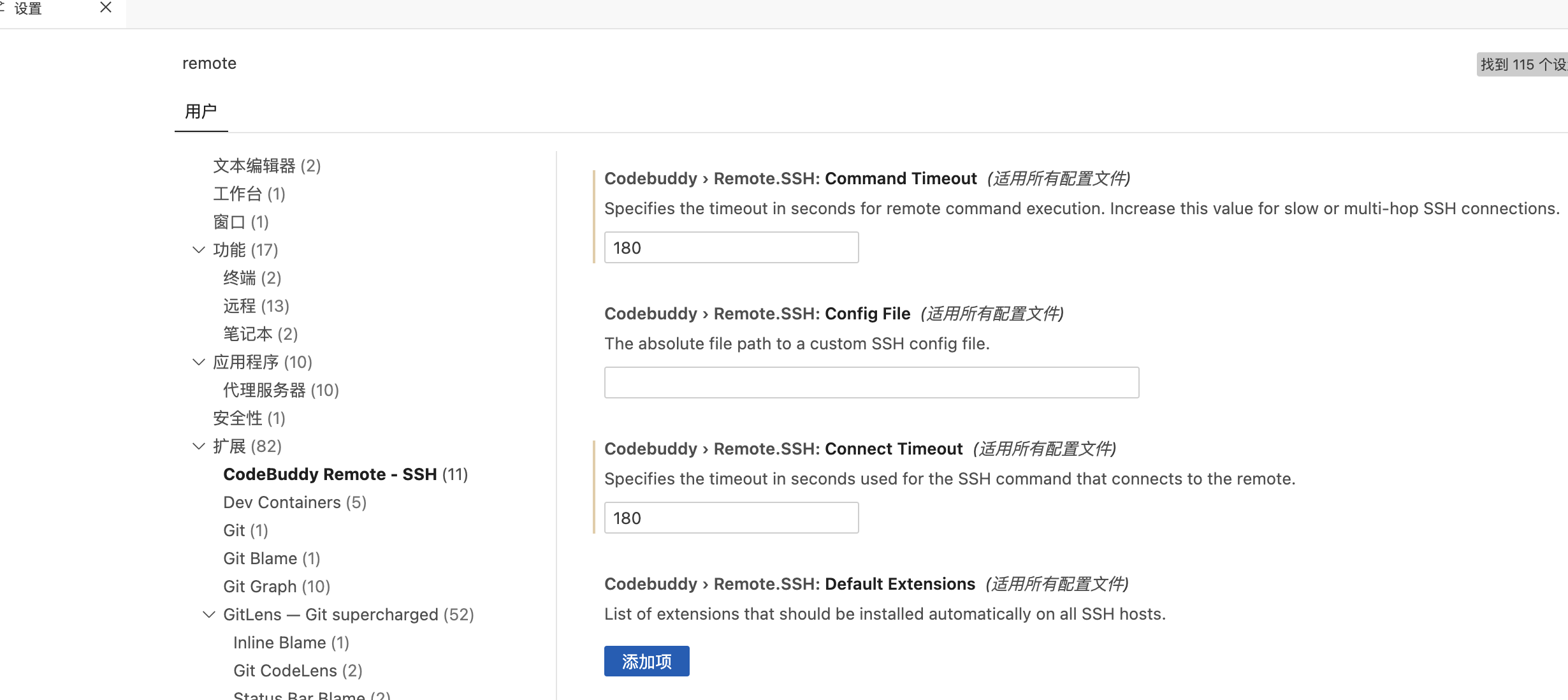
设置一下 codebuddy 的超时时间就好了,默认的超时时间太小了,不足以下载对应的插件,往大调就 ok 了 @gstorms(小城风雨)

@sixther(段超) 设置超时时间后可以了

Resolved ISSUE

就好了一天,今天重新连接又连不上

[Info  - 01:51:51.492] Resolving ssh remote authority 'codebuddy-remote-ssh+XXX' (attemp #1), (XXX)
[Error  - 01:51:51.523] Couldn't get identities from OpenSSH agent
Error: Failed to connect to agent
	at Socket.n (d:\tools\CodeBuddy CN\resources\app\extensions\open-remote-ssh\out\extension.js:1:133139)
	at Socket.emit (node:events:524:28)
	at Socket.emit (node:domain:489:12)
	at emitErrorNT (node:internal/streams/destroy:169:8)
	at emitErrorCloseNT (node:internal/streams/destroy:128:3)
	at process.processTicksAndRejections (node:internal/process/task_queues:82:21)
[Trace  - 01:51:51.523] Identity keys:
None
[Info  - 01:51:51.765] Trying no-auth authentication
[Warn  - 01:51:51.878] All authentication methods exhausted for ssh cnb-fog-1joi25a4t-001.11d8876d-b2b2-480c-8cee-6245a217606a-r7g@cnb.space
[Warn  - 01:51:51.878] Methods left: none
[Warn  - 01:51:51.878] Preferred authentications: publickey, password, keyboard-interactive
[Error  - 01:51:51.881] Error resolving authority
Error: All configured authentication methods failed
	at me (d:\tools\CodeBuddy CN\resources\app\extensions\open-remote-ssh\out\extension.js:1:161964)
	at d:\tools\CodeBuddy CN\resources\app\extensions\open-remote-ssh\out\extension.js:1:422626
	at authHandler (d:\tools\CodeBuddy CN\resources\app\extensions\open-remote-ssh\out\extension.js:1:415140)
	at ye (d:\tools\CodeBuddy CN\resources\app\extensions\open-remote-ssh\out\extension.js:1:165182)
	at USERAUTH_FAILURE (d:\tools\CodeBuddy CN\resources\app\extensions\open-remote-ssh\out\extension.js:1:153985)
	at 51 (d:\tools\CodeBuddy CN\resources\app\extensions\open-remote-ssh\out\extension.js:1:317998)
	at e.exports.F (d:\tools\CodeBuddy CN\resources\app\extensions\open-remote-ssh\out\extension.js:1:184527)
	at $.decrypt (d:\tools\CodeBuddy CN\resources\app\extensions\open-remote-ssh\out\extension.js:1:280863)
	at e.exports.H [as _parse] (d:\tools\CodeBuddy CN\resources\app\extensions\open-remote-ssh\out\extension.js:1:184051)
	at e.exports.parse (d:\tools\CodeBuddy CN\resources\app\extensions\open-remote-ssh\out\extension.js:1:188438)
	at Socket.<anonymous> (d:\tools\CodeBuddy CN\resources\app\extensions\open-remote-ssh\out\extension.js:1:160704)
	at Socket.emit (node:events:524:28)
	at Socket.emit (node:domain:489:12)
	at addChunk (node:internal/streams/readable:561:12)
	at readableAddChunkPushByteMode (node:internal/streams/readable:512:3)
	at Readable.push (node:internal/streams/readable:392:5)
	at TCP.onStreamRead (node:internal/stream_base_commons:191:23)

=======================================================
  SSH Connection Diagnostics - XXX
  Time: 2026-05-14 01:51:51  |  Total: 388ms
=======================================================

  [OK] SSH Config Loading           [23ms]    
  [OK] SSH Key Loading              [6ms]     
  [FAIL] SSH Connection               [358ms]    FAILED

  -- FAILURE: SSH Connection --

  ERROR: All configured authentication methods failed

  SUGGESTED FIXES:
    1. Check the "Remote - SSH" output channel for detailed logs
    2. Try connecting manually: ssh <user>@<host>

=======================================================

Developer

@gstorms(小城风雨) 新版本的 codebuddy 有些问题,已经修好了,等下一个版本更新下就好了

@sixther(段超) 好,什么时候更新

1

最新版本更新已经可以了

Resolved ISSUE
Assignee
None yet
Label
一定是bug:待鉴定
Priority
None yet
Time period
-
Property
Add custom properties to record and label key information
Participant