This project provides scripts and tools to build and run the WeChat DevTools on Linux (GNOME desktop). It helps assemble the required NW.js / Node / native modules and packaging so the DevTools can be used and updated on Linux systems.
The project is adapted from https://github.com/dragonation/wechat-devtools/ and aims to make a working Linux distribution of the official WeChat DevTools.
The current tool can build the latest version 2.01.2510280 on Linux, with CLI mode support.
You can now modify fonts directly in the settings interface by entering the font name manually.
conf/config.latest.json provides a latest experimental profile to freeze the latest NW.js / Node / native module version combinations; enable it by adding --profile latest to the script.
Note:
These tests are only verified when fixing a particular feature, and do not guarantee normal usage on your system, as I do not have the resources to test each version release.
If you encounter any unsolvable issues, please open an issue.
- A Linux desktop system based on GNOME is preferred (other desktop environments may have issues; untested)
- CI auto-builds require specific glibc and libstdc++ versions: glibc >= 2.23, libstdc++ >= 3.4.21
If you download thewineversion, you needwineandwine-binfmtsupport; version 5.0+ recommended
The bin directory contains the wechat-devtools-cli script, which is the Linux version of the WeChat DevTools command-line support. Related documentation can be found on the WeChat CLI Command Line V2 page.
- Online Installation
- You can find pre-built packages in this project's Release. If the Release version has issues, try the Continuous version, which is built from the latest master branch commits and fixes bugs promptly, but may introduce new ones.
- You can build it yourself
Currently supports the following platforms:
- UOS App Store (deepin)
Note: If you want to build the wine version, set the environment variable
export WINE=true. Note: This is not supported.
This method has a ~99% success rate; it may fail with unstable networks due to mirror availability limitations.
- If building the
wineversion, installwineandwine-binfmtin your Linux environment first. - Install
dockeranddocker-compose. - Clone this project:
git clone --recurse-submodules https://github.com/msojocs/wechat-web-devtools-linux.git - Run the following command in your local project directory to build the DevTools:
tools/build-with-docker.sh - (Optional) Run the following command to install the application icon:
./tools/install-desktop-icon-node
After that, you can launch WeChat DevTools by clicking the application icon or running bin/wechat-devtools from the command line.
Since node-gyp and nw-gyp are used, this method can encounter unpredictable issues due to python and node versions (e.g., no error messages but modules silently fail to build with node 15.0.1). However, the Docker build method handles these issues for you.
-
If building the
wineversion, installwineandwine-binfmtin your Linux environment first. -
Install build dependencies for
nodegit:python2.7 python3.6+ libkrb5-dev gcc openssl libssh2-1-dev g++ make pkg-config.Also, older
7zversions may have issues (minimum version untested; e.g., the one in ubuntu16.04 doesn't work). See theDockerfilefor reference. -
Clone this project:
git clone --recurse-submodules https://github.com/msojocs/wechat-web-devtools-linux.git -
Run the following command in your local project directory to build the DevTools:
./tools/setup-wechat-devtools.sh -
(Optional) Run the following command to install the application icon:
./tools/install-desktop-icon-bash.sh
After that, you can launch WeChat DevTools by clicking the application icon or running bin/wechat-devtools from the command line.
- Supports the latest version with continuous personal updates; new tags trigger automatic CI builds and Release uploads.
- The core build process is completely open-source and can be modified.
- Fixed NWjs Menu segmentation faults to ensure the latest version runs correctly (by dragonation).
- Node modules are recompiled during the build to ensure native modules work correctly on Linux.
- Update downloads support resumable transfers and use the Taobao domestic npm mirror for faster downloads (stability to be tested).
- Pure Linux support using C++ to simulate the official compiler. wx-compiler
See: Processing Plan
See: Migration Process Records
Start the Server, then click compile; the first time you start the Server you will get a wine configuration prompt, no need to install mono.
WARNING
Experimental feature; please open an issue for any problems. Thanks. Known issues: https://github.com/msojocs/skyline-client-server
docker run -d -it \
  --restart=always \
  --hostname="$(hostname)" \
  --env="DISPLAY" \
  --platform="linux/amd64" \
  --volume="${XAUTHORITY:-${HOME}/.Xauthority}:/root/.Xauthority:ro" \
  --volume="/tmp/.X11-unix:/tmp/.X11-unix:ro" \
  --volume="/dev/shm:/dev/shm" \
  -p 3001:3001 \
  --name skyline_server \
  ghcr.io/msojocs/skyline-client-server:master
For more, see: FAQ
Version 1.05.2201240

Version 1.03.2006090

Version 1.02.2001191

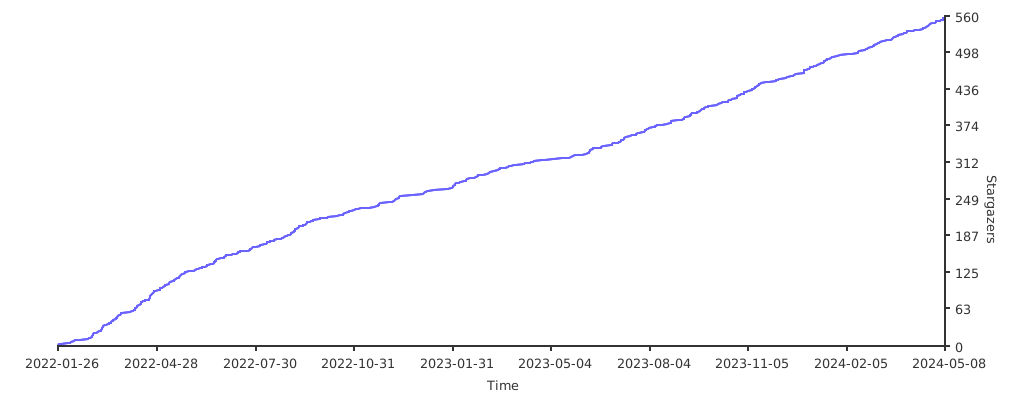
If this repository makes you feel comfortable, you can star it or buy this novice college student worker a cup of coffee (please include your GitHub nickname if possible):

Listed in reverse chronological order
| Sponsor | Date |
|---|---|
| yinyu | 2026-01-03 |
| returning | 2025-07-12 |
| 👍 | 2025-07-10 |
| hanwor | 2025-06-17 |
| ... | 2025-03-29 |
| SakuraPuare | 2025-03-24 |
| senseab | 2024-12-21 |
| l | 2024-12-08 |
| lcurk0 | 2024-11-29 |
| stvsl | 2024-11-26 |
| 仙人柱 | 2024-11-20 |
| cabbage7th | 2024-10-06 |
| shao4598 | 2024-09-24 |
| OWALabuy | 2024-08-28 |
| wangvation | 2024-07-16 |
| 孤泉冷月 | 2024-07-12 |
| liushuai05 | 2023-12-26 |
| LGTU | 2023-11-25 |
| WRXinYue | 2023-11-09 |
| silentdoer | 2023-09-26 |
| ??? | 2023-08-11 |
| Geequlim | 2023-07-12 |
| 对方正在输入 | 2023-04-28 |
| @DaqiongYang | 2023-03-29 |
| AInoob | 2023-01-30 |
| ??? | 2023-01-18 |
| 仙人柱 | 2022-08-09 |
| guanzhengyinqin | 2022-07-14 |
| nsfoxer | 2022-06-30 |
| chiiihc | 2022-06-17 |
| younland | 2022-06-15 |
| chiiihc | 2022-06-14 |
| 陈陈菌 | 2022-05-29 |
| WWW | 2022-05-26 |
| 南极の短尾猫 | 2022-05-22 |
| 猪宝的猪 | 2022-05-15 |
| finalwhy | 2022-05-09 |
| CoryByte | 2022-04-23 |
| Starrah | 2022-04-12 |
| zyk-miao | 2022-04-12 |
| icepie | 2022-04-08 |
| Milder | 2022-03-23 |
| . | 2022-03-21 |
| shaoxp | 2022-03-16 |
| 李喆 | 2022-03-05 |
| david | ??? |
WeChat DevTools is copyrighted by Tencent Corporation. This project is for learning and communication purposes only. If there are any improprieties, please contact me at jiyecafe@gmail.com.